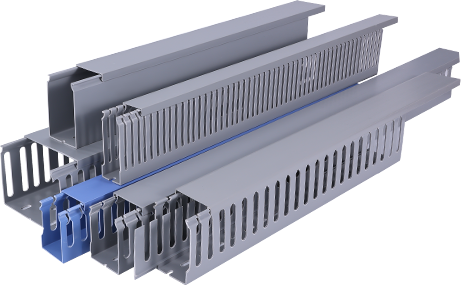
Whether you are completing a home renovation, setting up a new office network, or organizing wiring in a commercial space, PVC cable trunking is one of the most practical and affordable solutions for managing electrical and data cables. This tutorial will walk you through everything you need to know about PVC cable trunking, from core benefits to step-by-step installation, helping you achieve a clean, safe, and professional-looking cable management result. PVC cable trunking is a rigid enclosure made from polyvinyl chloride, designed to house and protect electrical wires, data cables, and communication lines running along walls, ceilings, or floors. Unlike open wiring or basic cable ties, trunking keeps cables hidden from view, prevents damage from moisture, impact, or dust, and reduces safety hazards caused by loose wires. Its lightweight construction and low cost make it a top choice for both DIY enthusiasts and professional electricians for residential, commercial, and industrial applications.
First, it is important to understand the key benefits of PVC cable trunking that make it stand out from other cable management options. One of the biggest advantages is its affordability – PVC is a widely available material, so trunking systems cost significantly less than metal alternatives like aluminum or steel trunking. It is also inherently non-conductive, meaning it provides an extra layer of electrical insulation that reduces the risk of electric shocks, making it ideal for domestic wiring projects. Additionally, PVC is resistant to moisture, corrosion, and most common chemicals, so it can be used in damp environments like basements, bathrooms, or outdoor covered areas without deteriorating over time. It is also easy to cut and modify on site, which saves time during installation compared to heavier metal options.
Secondly, choosing the right size and type of PVC cable trunking is a critical first step before starting any installation. Trunking comes in a wide range of dimensions, from small 10mm x 10mm options for hiding low-voltage data cables behind a TV, to large 100mm x 100mm sizes that can hold dozens of power cables for commercial server rooms. When selecting the right size, always leave 20-30% extra space inside the trunking for future cable additions or upgrades, as overcrowding can make it difficult to access cables later and increase heat buildup around power lines. You also need to choose between surface-mounted and flush-fit trunking: surface-mounted trunking is installed directly on top of walls and is the best option for DIY projects, as it requires no channelling into plaster. Flush-fit trunking is recessed into the wall for a completely seamless finish, which is more common in new construction or major renovations.
Another key part of this tutorial is the step-by-step installation process for surface-mounted PVC cable trunking, which is accessible even for beginners with basic tools. First, plan your route: map out where the trunking will run along the wall, marking the position with a pencil and ensuring you avoid any existing hidden pipes or wires with a pipe and cable detector. Next, cut the trunking to your required lengths using a fine-tooth hacksaw or a PVC cutting tool, sanding down any rough edges to ensure a smooth fit. After that, fix the base of the trunking to the wall: you can use strong adhesive for light, low-cable projects on flat walls, or screw the base into wall plugs for heavier installations or uneven surfaces. Once the base is secure, feed all your cables into the base, making sure they lay flat and do not overlap too much. Finally, clip the PVC cover onto the base, starting from one end and working your way along to ensure it locks firmly into place. For corners or junctions, use purpose-made PVC connectors and elbows to create a neat, professional finish instead of cutting the trunking at awkward angles.
Additionally, there are some important best practices to follow to ensure your PVC cable trunking installation stays safe and functional for years. Never mix high-voltage power cables and low-voltage data cables in the same trunking unless the trunking has a built-in divider, as this can cause electrical interference that disrupts internet or phone signals. Always leave a small gap between the end of the trunking and any electrical outlets or junction boxes to allow for easy access when you need to add or replace cables. If you are installing trunking in areas that get direct sunlight, choose a UV-stabilized PVC option, as standard PVC can become brittle and discolored when exposed to prolonged UV radiation. For fire safety, always check that your PVC trunking meets local building code standards for flame resistance, especially when installing in commercial or public buildings.
In conclusion, PVC cable trunking is a versatile, cost-effective, and user-friendly solution for almost any cable management project, and with the right preparation and basic tools, even first-time DIYers can achieve a professional result. By choosing the correct size and type for your project, following the simple installation steps, and sticking to basic safety best practices, you can turn a messy tangle of loose wires into a clean, organized, and safe installation that will last for decades. Whether you are hiding cables behind a new home entertainment system or organizing wiring for a small business, this tutorial gives you all the information you need to get started with PVC cable trunking confidently.